

Create and review
FIM waypoints and radii
Adding waypoints and zones to a note, with opening and validation radii, penalties and speeds, from the FIM W2RC 2027 and Training profiles or from your own profiles.
A waypoint is attached to a note. The Studio knows the 16 types in the FIM W2RC 2027 rules, with their radii and penalties; the meaning of each type is in the rules in brief.
Adding a waypoint
- Select the note in the RoadBook or on the map.
- In the inspector, Waypoint section, press + Add waypoint.
- Choose the type: WPV, WPE, WPM, WPS, WPC, WPP, WPN, CP, DSS, ASS, DZ, FZ, DN, FN, DT, FT.
- The fields are filled in with the values of the roadbook's radius profile (FIM W2RC 2027, Training or one of your profiles). Change them if the event calls for something else:
- Opening in metres: within this distance the rider's GPS shows the direction; empty means "always".
- Validation in metres: the radius within which the passage is valid.
- Penalty in minutes, or
stagefor the stage penalty decided by the organiser. - Speed in km/h, only for DZ, DN and DT.
- Press Add followed by the type (for example Add WPM).
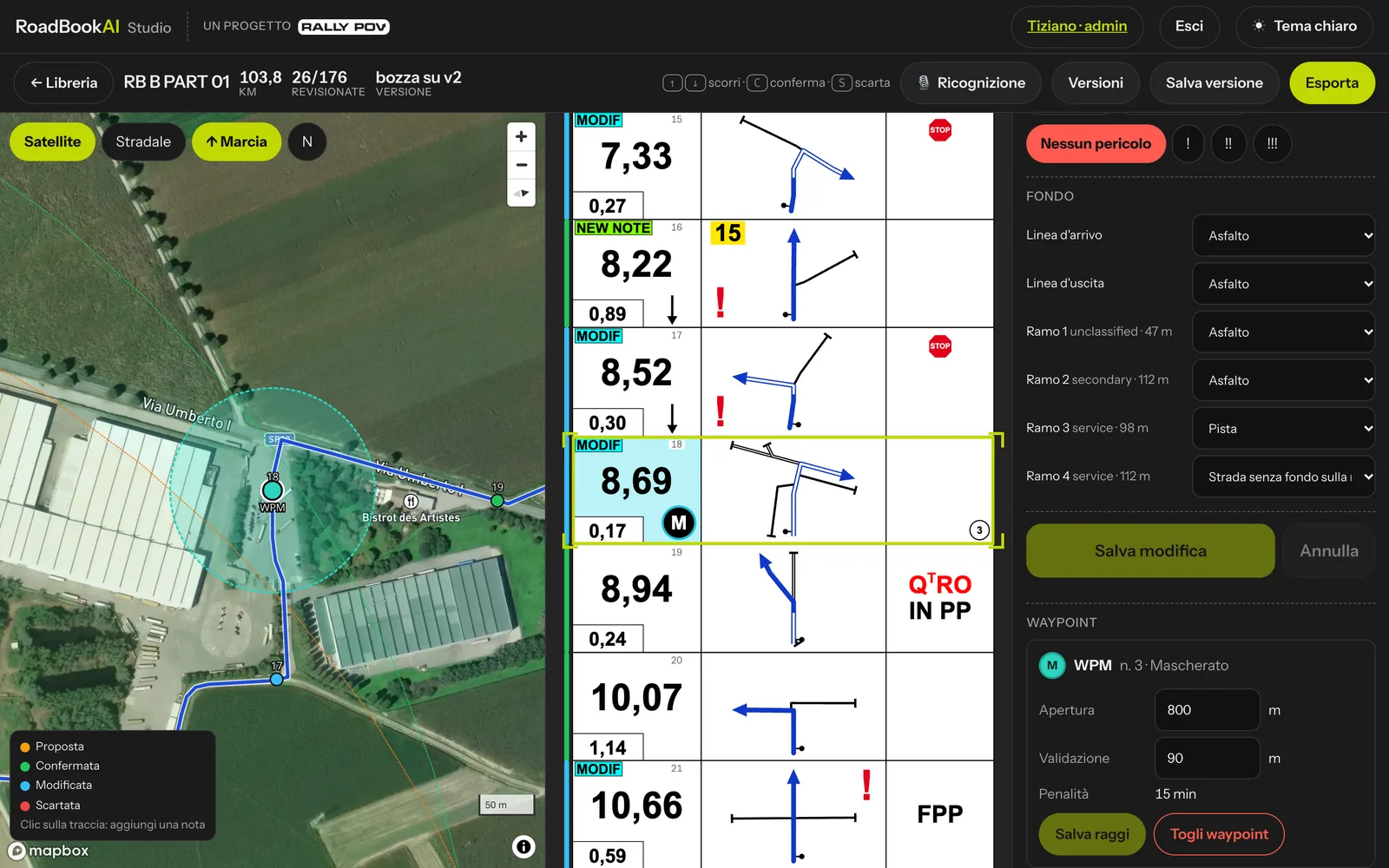 A waypoint in the inspector and its opening and validation circles on the map.
Changing or removing a waypoint
The waypoint card shows type, number, opening, validation, penalty and speed. You can change the two radii and press Save radii, or Remove waypoint.
Where you see it
- Map: a dot coloured by type, with the validation circle solid and the opening circle dashed.
- RoadBook and PDF: the waypoint badge at the km of the note, in the colours of the FIM table; between DZ and FZ the speed zone is framed. The first page of the PDF summarises the day's table of radii and penalties and the list of waypoints (number, type, km; coordinates of WPVs and WPSs; WPPs appear only here).
- App: the same radii open and validate the waypoints in the cockpit, and the service uses them for the results.
- RN2: the waypoint with its radii, ready for roadbook apps and software.
- OpenRally: the markers
wpv,wpm,dz,fz… with opening and validation.
System profile values
| Type | Opening | Validation | Penalty |
|---|---|---|---|
| WPV | always | 200 m | 15 min |
| WPE | 1000 m after the previous one | 90 m | 15 min |
| WPM | 800 m | 90 m | 15 min |
| WPS | 1000 m | 30 m | 15 min |
| WPC | no guidance | 300 m | 15 min |
| WPP | 100 m, no guidance | 20 m | 2 min |
| WPN | 800 m | 200 m | 60 min |
| CP | 1000 m after the previous one | 90 m | 120 min |
| DSS | 1000 m after the previous one | 200 m | stage |
| ASS | 800 m | 90 m | stage |
| DZ, FZ | 1000 m after the previous one | 90 m | 15 min |
| DN, FN, DT, FT | 1000 m after the previous one | 90 m | stage |
"After the previous one" means that the waypoint opens when the previous one has been validated, or within 1000 m if the previous one was missed.
The Training profile uses the same types with validation radii 50 % wider (for example WPM at 135 m) and no penalties: it is designed for training without the pressure of a race.
The WPS has hidden coordinates: guidance appears only within 1000 m.
The rules allow the organiser to redefine radii and penalties in the supplementary regulations or on the first page of each day's roadbook: that is why every value can still be edited, and the values you use often can be saved in a profile.