

Create and review
Drawing editor
Redrawing the note by hand - arrows, tracks and terrain, icons, text, CAP and danger.
When you want a drawing different from the engine's, you redraw it by hand. You can easily edit every kind of arrow, track and terrain, and the result appears exactly the same in the RoadBook, in the PDF and in the RN2.
Opening it
- Double-click a row of the RoadBook, or
- ✎ Edit drawing in the inspector.
The editor opens over the RoadBook and the inspector; the map stays visible alongside. At the top you can see whether you are starting from the engine proposal or from a hand-drawn note already saved.
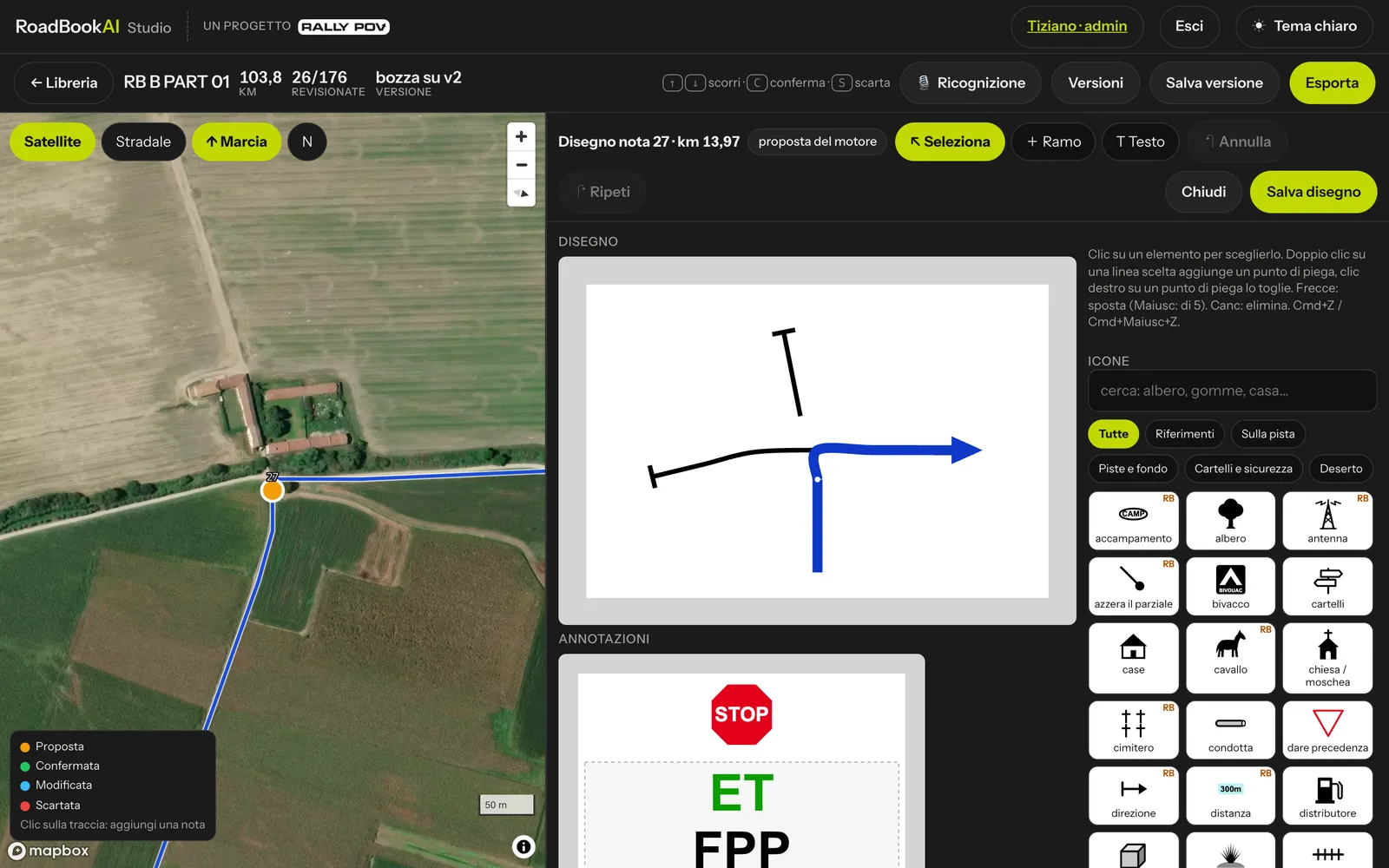 The drawing editor: drawing and annotations enlarged, properties and icons on the right.
The tools
| Tool | What it does |
|---|---|
| ↖ Select | pick an element with a click and move it by dragging |
| + Branch | draw a new road or track: click on the drawing to place points (the first one near the junction snaps to the blue line), double-click or Enter to finish, Esc to cancel |
| T Text | click in the annotation column (or in the drawing) where you want to place free text |
| Icons | pick an icon in the palette and then click where you want to place it, or drag it there |
Arrows, tracks and terrain
- Click a line to select it, then drag it to bend it: double-click on the line adds a bend point, right-click on a point removes it.
- For a road or a track, choose the line type on the right (asphalt, track, small track, faint track, off-track…) or Delete branch.
- For the blue line, the rider's route, choose the surface on arrival and on exit.
You only change the drawing: km, map and GPS track stay as they are.
Icons
The palette contains the RoadBookAI icons, divided into groups (Landmarks, On the track, Tracks and surface, Signs and safety, Desert) and searchable by name: "tree", "tyres", "house"… A selected icon can be moved, resized and rotated with the mouse or with the sliders on the right; with Shift rotation snaps in 15° steps.
Icons marked RB are exclusive to RoadBookAI: in the RN2 they travel with their drawing embedded.
CAP, danger, waypoints and controls are not in the palette: they are values of the note and are set from the inspector.
Text, CAP and danger
- Free text is written in capitals, with size and colour (black, red, green, blue).
- The lexicon annotations (PP, Qᵀ, ET…) come from the note's fields: in the editor they move as a block, up or down, and are edited from the inspector.
- CAP and danger can be dragged to where they belong; the value is changed from the inspector.
Keys
| Key | Action |
|---|---|
| ← → ↑ ↓ | move the selected element (by 5 with Shift) |
| Delete or ⌫ | delete the selected element |
| Cmd+Z | undo (also with ↶ Undo) |
| Cmd+Shift+Z | redo (also with ↷ Redo) |
Saving or going back to the engine
- Save drawing: the note becomes modified and, in the next saved version, receives MODIF. The comparison between versions flags it as "hand-drawn".
- Restore engine (hand drawings only): after confirmation, goes back to the drawing proposed by the engine; the hand edits to that note are lost.
- Close exits without saving (if you have changed something, it asks for confirmation).
With a hand drawing, roads, tracks and icons can only be changed in the editor: the inspector reminds you.
In the PDF the hand drawing is fitted to the cell; for notes without a hand drawing, the PDF shows a slightly wider portion of the map.