

Organising an event
Stage rules
For the organiser - time-based or clean navigation classification, start and finish, waypoint penalties, unlock codes, speed, race STOP, neutralisations with exit area and GO, maximum time, retirements and the 70 % threshold, controls, opening bonus, LateNote, automatic scrolling, regulation mode, integrity and classifications.
The stage rules decide how the results are calculated and how the rider's app behaves. They travel in the stage's encrypted package and the service uses them for the official calculation. You open them from the Stages tab with Race rules; each item has its own explanation in the window.
The service is the referee
The app helps the rider navigate, but it does not decide the results. Waypoints taken or missed, speeding, race STOPs, neutralisations and times are recalculated on the service from the recorded GPS track, with the stage rules. Validations and skips pressed in the app remain as rider actions, useful in the replay. If you correct a rule, or race control takes a decision (see Race, live and results), the results are recalculated automatically. Simulated or inaccurate points, or points with GPS jumps, are discarded; two devices of the same rider are merged.
Anything that is not a penalty but deserves a look goes among race control's anomalies (in the live view and on the rider's sheet): an app that used rules different from those of the stage, automatic scrolling turned on where it is not allowed, a phone whose integrity is doubtful, a rider who started late without being on the line.
Profile and starting values
The rules start from a Rules profile: FIM W2RC 2027 (the default for race stages), Training or one of your profiles. The profile's values are copied into the stage; each value can be changed for the stage and, where needed, per class. If you change any, Modified appears.
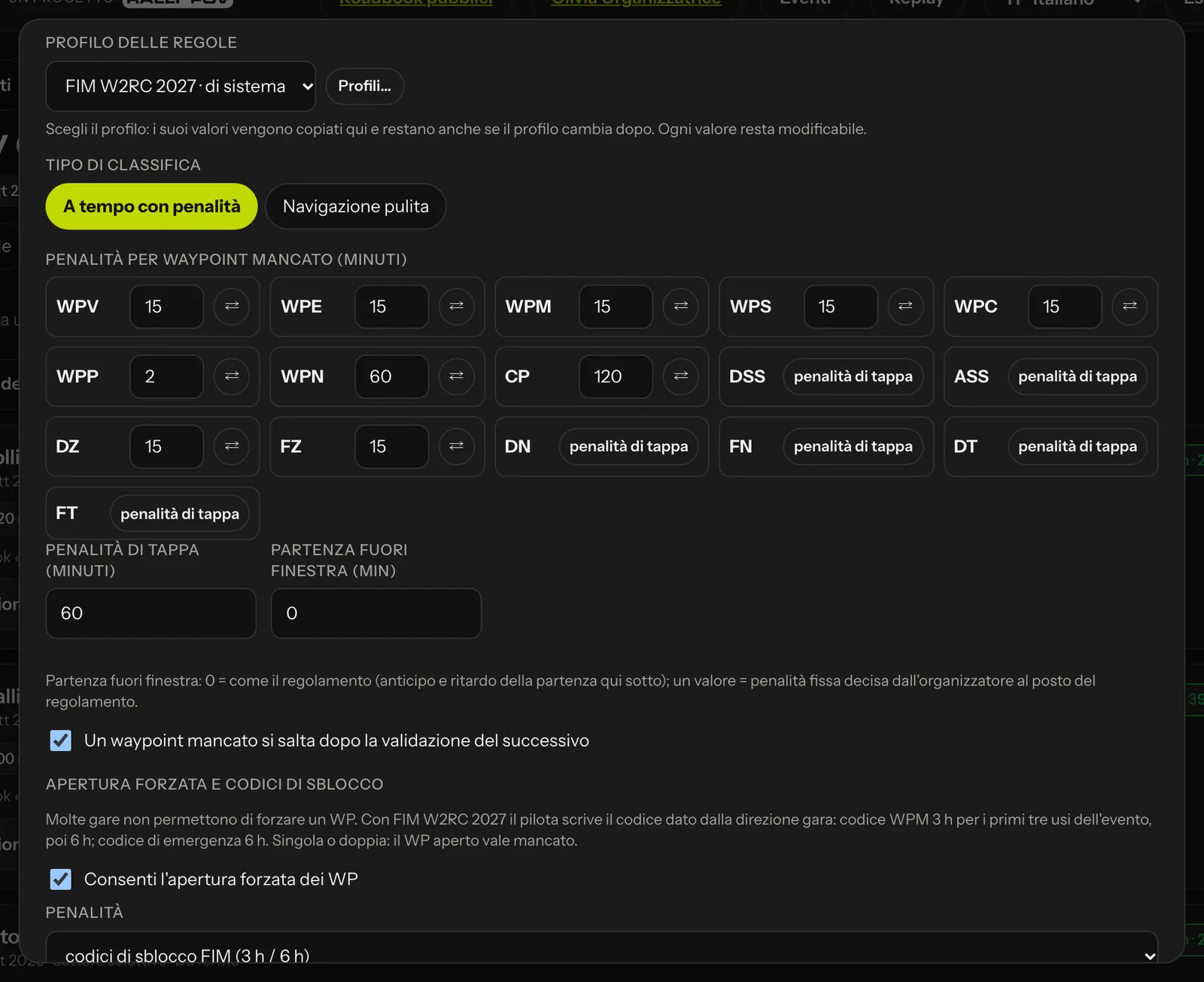 The top part of the rules: profile, classification and waypoint penalties.
Classification type
- Time with penalties: the time from DSS to ASS plus penalties (FIM style). In the overall classification the stages are added together.
- Clean navigation: no stopwatch, a score from 0 to 1000: 500 for the waypoints taken, 250 for the rules respected (25 points are taken off for each infringement: speed pulse, race STOP, early exit, LateNote if you decide so), 250 for the distance ridden close to the track (within 50 m). It is the classification suited to training and navigation tests. Weights and points are changed in the Clean navigation panel.
In an overall classification with stages of both types, riders are ranked by time. RoadBook and GPX are always separate categories.
Start and finish
- The stopwatch starts at the DSS and stops at the ASS; with Times on the line (FIM W2RC 2027 profile) the rolling start and the finish are taken on the line, not on entering the radius.
- Early start: 1 minute.
- Stopped on the line: a rider who was on the start line at the time of the signal and stays stopped for more than 30 s gets 2 minutes.
- Late at the start: 1 minute per minute (or fraction), but only when the timekeeper records the real start time with Rider's delay (GPS cannot tell a rider waiting in the queue from one who arrived late: in that case an anomaly appears).
- Start refused beyond 30 minutes late (60 if the supplementary regulations say so; 0 = never): the rider is not started.
- Rolling start: start window; with Start outside the window at 0 the rules of the regulations apply, with a value your own fixed penalty applies.
- Prologue: time to a tenth of a second.
Waypoints
For each type, a penalty in minutes for a missed waypoint, or the stage penalty (DSS, ASS, DN, FN, DT, FT). A missed CP is worth 120 minutes. With A missed waypoint is skipped once the next one is validated, the app does not stay stuck on a WP the rider has not found: it marks it as missed and moves on.
Waypoint radii and penalties are those of the frozen roadbook; the FIM W2RC 2027 profile uses the table in the regulations (details in FIM rules in brief).
Forced opening and unlock codes
When a rider cannot find a waypoint, some races allow them to force it open: the arrow guides them, but that WP counts as missed. With Allow forced opening of WPs you choose:
- FIM unlock codes (3 h / 6 h), in the FIM W2RC 2027 profile: race control gives the rider a WPM code, which makes WPMs and WPSs visible (3 hours of penalty for the first three uses in the event, 6 hours from the fourth), or the emergency code, which makes all WPs visible (6 hours). The rider types it in the app; the WP opened with the code is validated by GPS;
- a single penalty (the normal penalty for a missed WP) or a double one (twice the penalty for that WP type), in your own profiles;
- off: the apps do not offer forced opening (neither from the cockpit, nor from the menu, nor from the remote) and explain why.
You find the stage's codes in Results with Unlock codes (the service generates them; each time they are viewed is recorded in the log); you can also enter your own, at least 4 characters long. Only a fingerprint of the codes travels in the stage package, never the code itself.
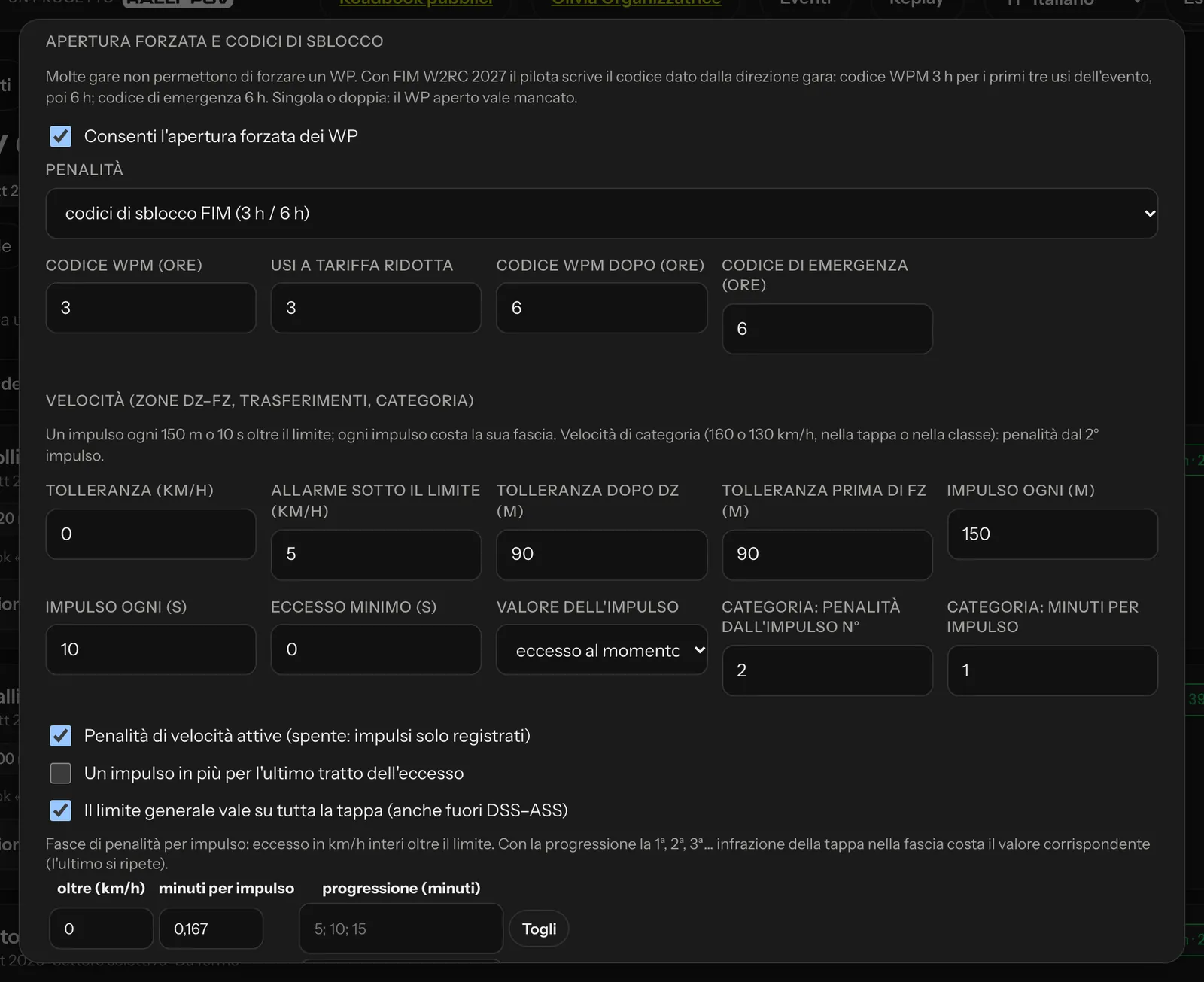 Forced opening and unlock codes, then the speed rules.
Speed
In DZ–FZ zones, in liaisons and with the general speed limit of the stage or class:
- the app gives the alarm 5 km/h below the limit (you decide the margin, and in regulation mode the rider cannot change it);
- there are 90 m of tolerance after the DZ and before the FZ;
- speeding is counted in pulses, one every 150 m or 10 seconds over the limit; the value of the pulse is the excess at that moment.
Each pulse costs according to the band of the excess. With the FIM W2RC 2027 profile:
| Excess over the limit | Penalty per pulse |
|---|---|
| 1–5 km/h | 10 s |
| 6–15 km/h | 1 min |
| 16–40 km/h | 2 min |
| over 40 km/h | 6 min |
The bands are changed in the table (+ Band, Remove); Reset as the regulations brings back the values above, As the manual uses the progression of 5, 10 and 15 minutes for the first, second and third infringement over 40 km/h. With Speed penalties active off, pulses are only recorded. The category speed per class (for example 160 or 130 km/h) costs 1 minute per pulse from the second pulse; the liaison limit applies over the whole stage.
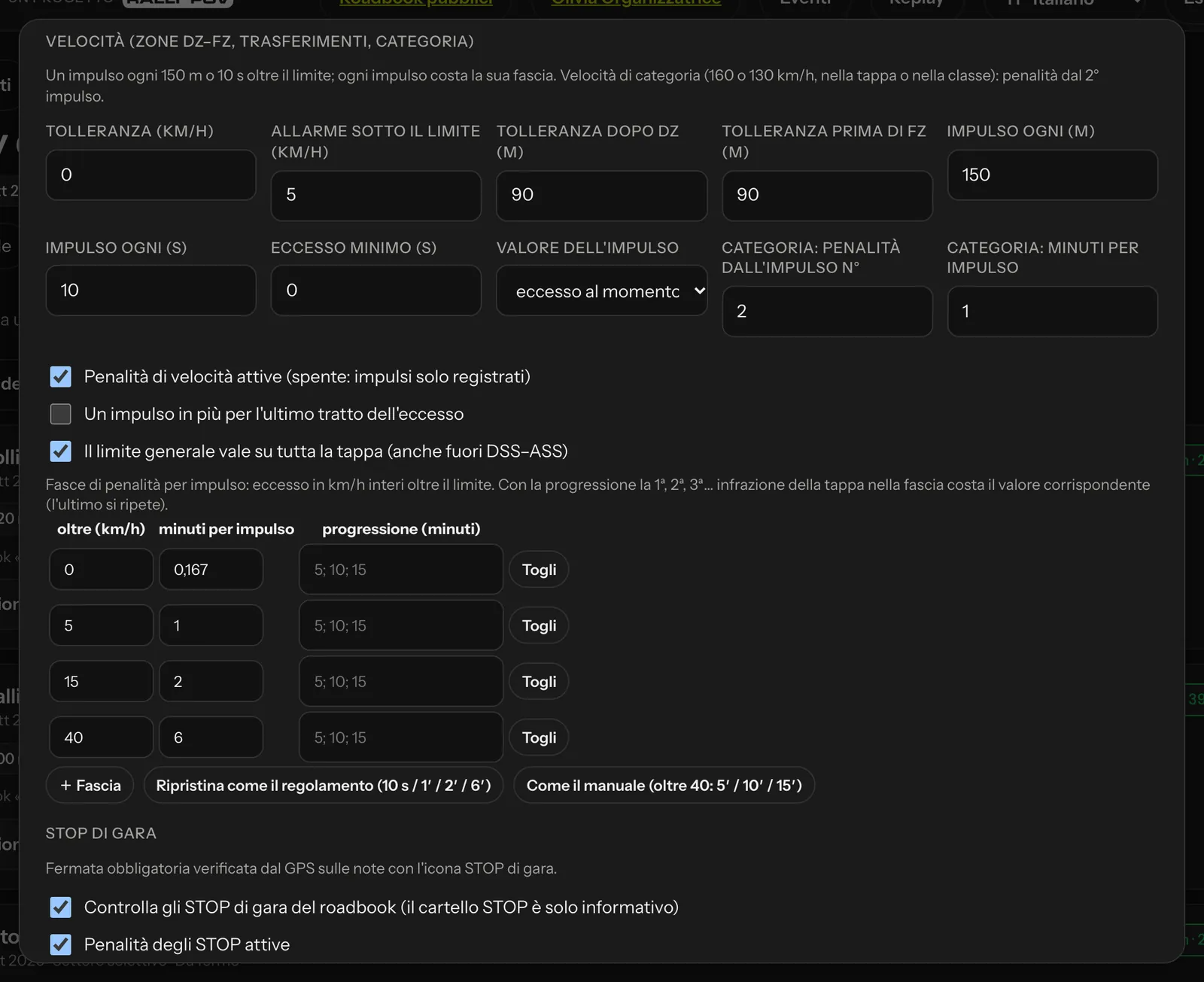 Speed bands and race STOP.
Race STOP
The roadbook's STOP sign is for information only. The race STOP (red disc with the stopwatch) is a compulsory stop with the duration written in the note: the service checks that the rider stays below 2 km/h inside the radius for that duration. Initial values: 30 m radius, 3 s stop if the note says nothing else, 3 minute penalty.
Neutralisations and liaisons
Between DN and FN time is neutralised: the scheduled duration (written in the roadbook) is taken off, from the validation of the DN. In the app the rider sees:
- from the DN, a large green countdown with "NEUTRALISATION";
- the exit area is the validation radius of the FN: riders may enter it only in the last 60 seconds (with the FIM W2RC 2027 profile; the value can be changed). Inside the area: "STOP — wait for the marshals". If they enter earlier, a yellow notice says "Too early: wait outside the exit area";
- at zero, a large green GO with sound and vibration;
- if they leave the area before zero, the countdown turns red with "EARLY EXIT".
With the FIM W2RC 2027 profile an early exit costs 1, 2 and then 5 minutes (progression 1; 2; 5) counted over the whole event; The time gained is added to the special stage time. Alternatively you can choose a fixed penalty without progression. Riders who set off after zero carry on with their own time: waiting beyond zero counts in the stage.
Between DT and FT there is a liaison: with Liaison with imposed time the time imposed from the DT applies, with lateness and early arrival treated as in a neutralisation; the liaison speed limit applies over the whole section.
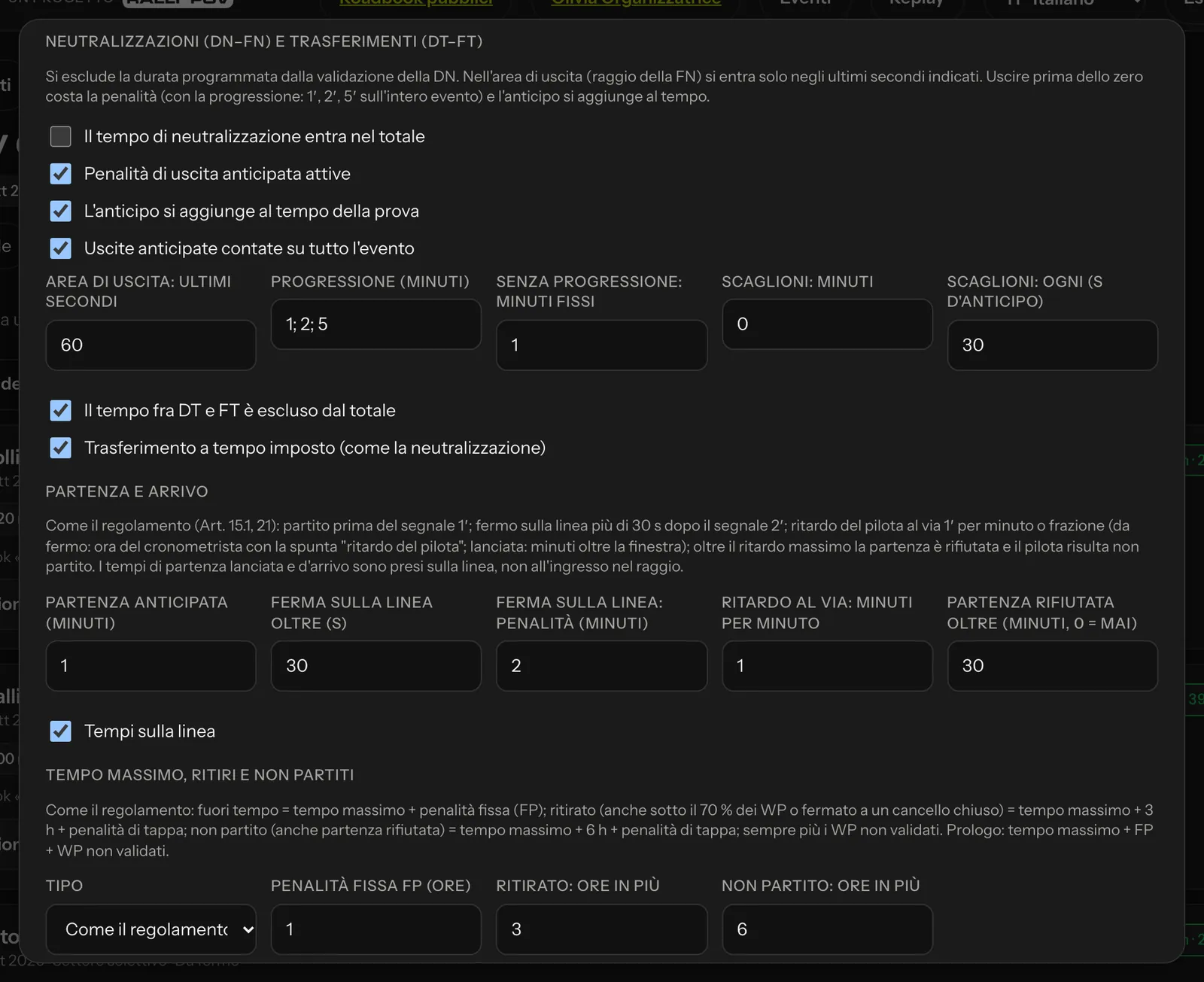 Neutralisations and liaisons, start and finish.
Maximum time, retirements and abandons
With Type: As the regulations (FIM W2RC 2027 profile):
- riders who exceed the maximum time get the maximum time plus the fixed penalty FP;
- a rider who has retired (including below 70 % of the WPs or stopped at a closed gate) gets the maximum time plus 3 hours and the stage penalty; one who did not start (including a refused start) gets the maximum time plus 6 hours and the stage penalty; in every case the value of the waypoints not validated is added;
- at the prologue: non-starters and retirements get maximum time + FP + WPs not validated.
The FP is entered in hours: the W2RC regulations leave it to the event's supplementary regulations; 1 hour is only the starting value. The 30-minute FP for a lost tablet is given by hand.
Retiring from the app (two confirmations) ends navigation: the remaining waypoints count as missed. With Threshold active, riders who validate fewer than 70 % of the waypoints of the selective section have abandoned: they are classified as retired, with the nominal time above (the stage penalty is not counted twice). The nominal time for non-starters is assigned only after the stage is closed.
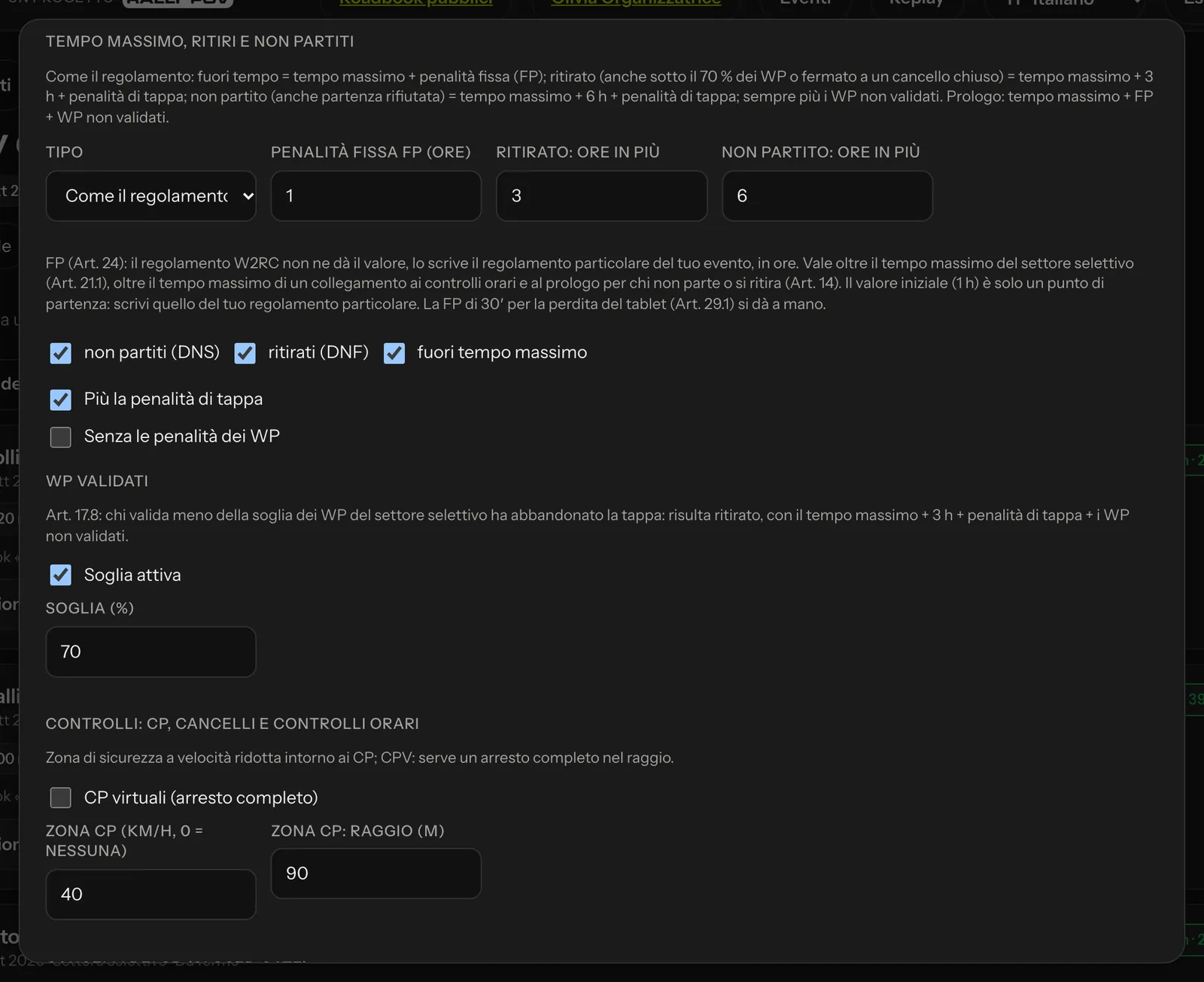 Maximum time, retirements and non-starters; threshold of validated WPs; controls.
Controls: CPs, gates and time controls
- CP zone: a limit (40 km/h) within a radius (90 m) around the CPs; virtual CPs require a complete stop.
- CP gates (closed gate): a time of day for each CP; riders who arrive later are stopped, are classified as retired and the WPs after the CP count as missed.
- Time controls (CH): each one on a WP of the RoadBook, with the imposed time and the reference; lateness costs 1 minute per minute, arriving early at departure CHs is an anomaly (the penalty is set by the supplementary regulations), beyond the maximum the start is refused. In the rider's detail you see the ideal time and the stamp of each CH.
- Sensitive zones: sections where leaving the track beyond a given distance is an infringement.
Opening bonus
The W2RC regulations reward the riders who open the track: some bonus WPs are marked in the RoadBook (invisible to the riders, every 10–30 km); the first rider to validate one (and anyone who validates it within 15 s) gains 0.5 s per km from the previous bonus WP (1 s for marathon stages or stages with more than 60 % dunes), excluding the last 10 km of the section and only for the classes indicated. A rider who leaves a neutralisation early does not get the bonus of the following WP.
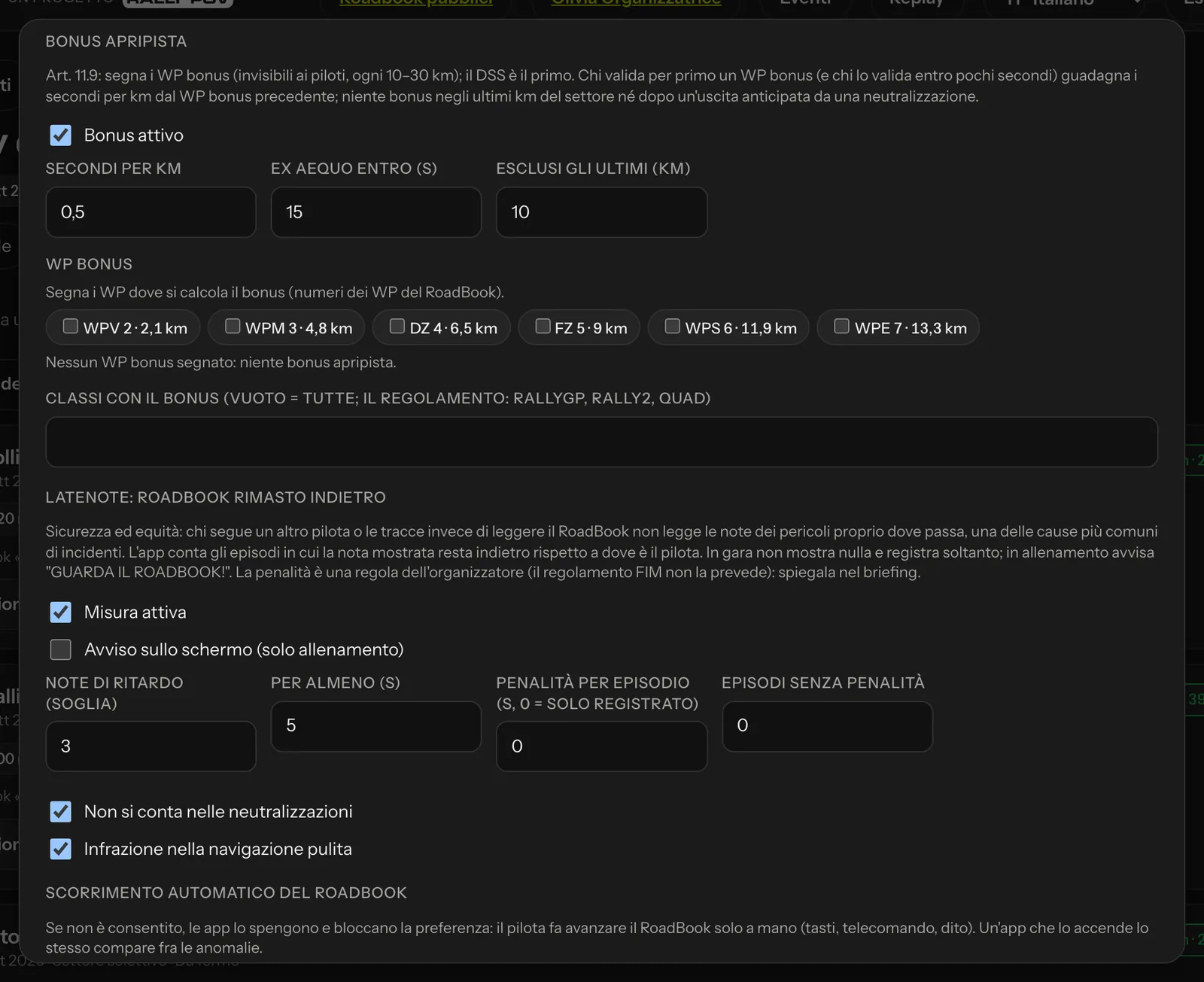 Opening bonus, LateNote and automatic scrolling of the RoadBook.
Automatic scrolling of the RoadBook
In the app the RoadBook can follow the position by itself (automatic scrolling) or move forward only by hand, with NOTE+, the remote or your finger.
- With the FIM W2RC 2027 profile automatic scrolling is always off and cannot be turned on: the regulations require the rider to move the RoadBook forward by hand ("W2RC regulations: the RoadBook is moved forward by hand").
- With the Training profile and in your own profiles without regulation mode it is allowed by default; you can turn it off (for the event, the stage or the profile). The tutor can do the same for their group.
When it is not allowed, the app turns it off and locks the setting with the reason, does not bring the RoadBook back to the active note after a manual scroll and never moves it by itself at any other moment; an app that turns it on anyway appears among the anomalies. Training without automatic scrolling is the best way to get used to reading the notes: it is the same habit that LateNote measures.
LateNote: the RoadBook left behind
In rally raids it happens that you follow another rider or the tracks on the ground instead of reading the RoadBook. The RoadBook falls behind and the rider does not read the danger notes exactly where they pass: a danger 3, a jump, a step, a STOP. It is one of the most common causes of accidents. What is more, a rider who follows exploits someone else's navigation: measuring it makes the race fairer.
LateNote measures it. The app compares the note at the top of the RoadBook with the last note the rider has actually passed (their position on the track, not the odometer): if it is more than 3 notes behind for at least 5 seconds, a LateNote episode begins, which ends when the RoadBook catches up again. It is not measured with automatic scrolling on (where allowed), in Rally GPS mode, when the rider is off course and, if you decide so, in neutralisations.
In the LateNote panel you choose:
| Item | Race default | What it decides |
|---|---|---|
| Measurement active | yes | whether episodes are recorded |
| On-screen warning (training only) | no | in a race it always stays off |
| Notes behind (threshold) | 3 | how many notes the RoadBook can fall behind |
| For at least (s) | 5 | for how long, before it counts as an episode |
| Penalty per episode | 0 | the seconds of penalty for each episode (0 = recorded only) |
| Episodes without penalty | 0 | how many episodes per stage are not penalised |
| Not counted in neutralisations | yes | |
| Offence in clean navigation | yes | each episode takes off points like the other infringements |
In a race the rider sees nothing on the screen: the app only records, and the episodes appear in the LateNote column of the results, on the rider's sheet, in the replay and in the report. In training, on the other hand, the screen warns "CHECK THE ROADBOOK!" (see Training and replay).
The FIM regulations do not provide for a LateNote penalty: it is your own rule, part of the supplementary regulations. Write it in the regulations and explain it at the briefing, with the reason why: it is above all a matter of safety.
Regulation mode in the apps
With the FIM W2RC 2027 profile (or with Regulation mode in the apps: Active), during a race stage the apps apply the choices of the regulations, with no other navigation aids:
- the RoadBook is moved forward by hand (no automatic scrolling);
- no coordinates or remaining km on the screen;
- no map with the track, unless you choose Map with the track for the RoadBook rider also in regulation mode;
- no free forced opening of waypoints (unlock codes apply);
- odometer recalibration on WP validation always on;
- speed alarm at your margin (5 km/h below the limit) and danger 2 and 3 sounds always on.
The settings the rider cannot change appear in the app locked with the reason; at the end of the stage the rider's own settings come back.
Integrity of race data
With Signed batches required every batch of data sent by the app is signed by the phone; with Only the main device counts the rider's main phone is the one that counts for the race (the backup one counts if the main one is lost). The maximum time gap between phone and GPS, unsigned batches and phones with root, jailbreak or a debugger go among the anomalies.
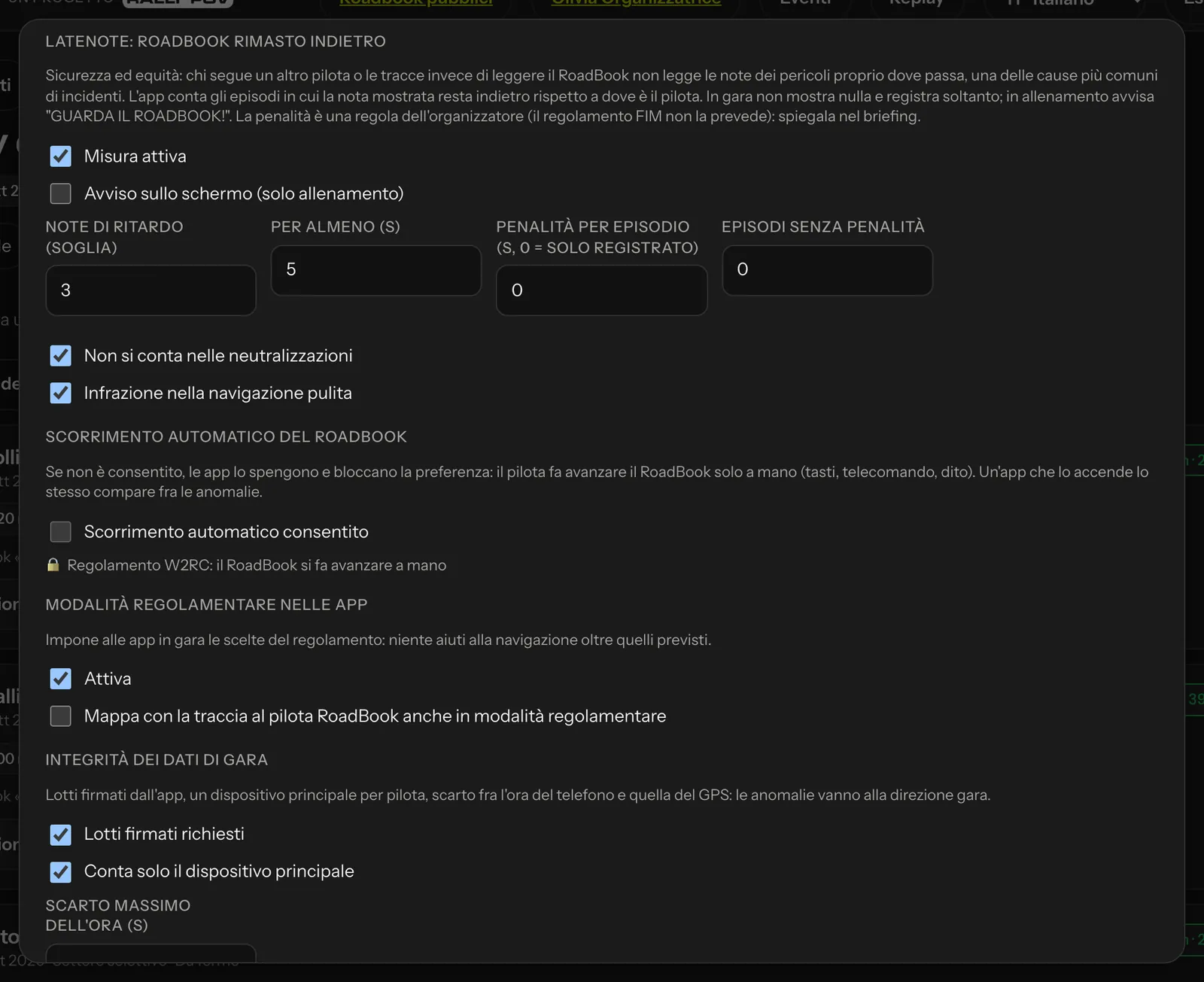 LateNote, automatic scrolling, regulation mode in the apps and integrity of race data.
Starting order and classifications
The Starting order panel holds the generator's values (mode, intervals, riders together, breaks, prologue categories), which you use from the Start times tab (see Entrants, start times and unlocking).
In the Standings panel: Protests within (minutes) (30 minutes) is the time between posting the provisional classification and the final one; Prologue to the tenth of a second.
Off-course alarm
If a rider takes a wrong turn and moves away, after the chosen km ridden off course (default 1 km beyond 150 m from the track) the app flashes OFF COURSE; with back-track allowed the rider can open an arrow that takes them back, along their own trail, to the last validated waypoint or to the point where they left the track. It is chosen per event (Replay tab), per stage and per class; it is on by default in clean navigation and in training, off in timed stages.
Race control alarms
In the live view race control sees an alarm when a rider has been stopped for more than 10 minutes outside a neutralisation, is off course by more than 200 m, has had no signal for 15 minutes or is going the wrong way for more than 300 m. The thresholds are changed here.
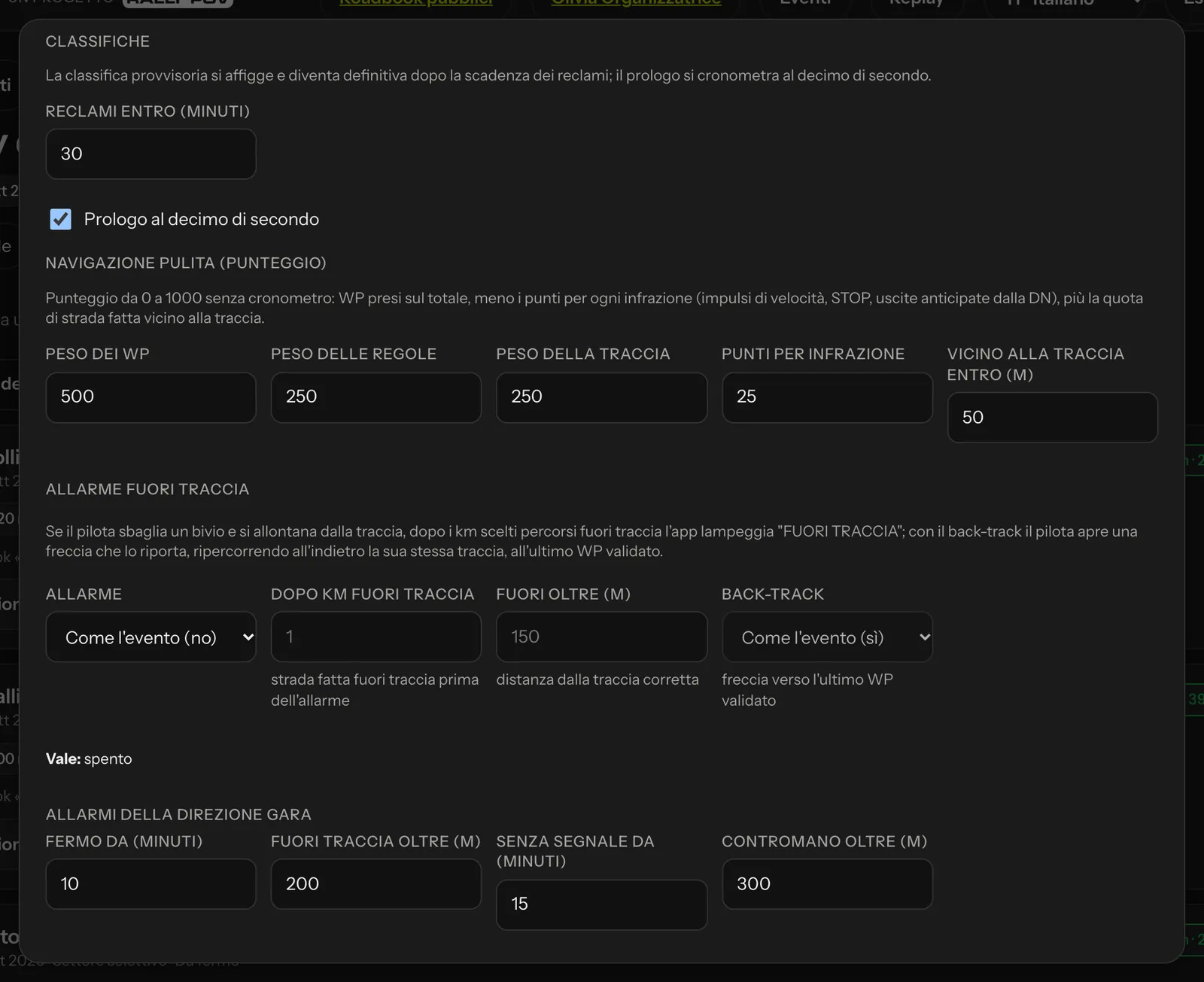 The bottom part of the rules.
Rider report
Whether the rider can download their PDF report is decided in the event's Replay tab, under Rider report: Riders can download their report No (default), Once the stage is closed or With the final classification, with a Rule per stage if a stage is an exception. Each rider sees only their own; you and your team can always download them, once the stage is closed.
The printed RoadBook
The stage PDF opens with a first page summarising the rules of the day: the table of waypoint radii and penalties of the profile used and the list of waypoints with number, type and km (with the coordinates of WPVs and WPSs; WPPs and the other hidden WPs appear only here). The waypoint symbols have the colours of the FIM table; a danger 3 stays marked until the linked waypoint is a WPS, and when you publish a stage with the FIM profile the Studio reminds you of it.
Rules by class
In the stage's Classes window each class can have its own start, time, window, maximum time, speed limit, category speed, counting in the overall classification and off-course alarm. For example: cars start one hour after the bikes, with a limit of 90 km/h.