

Create and review
Create a roadbook from GPX
The New roadbook window - track, name, how many notes (Essential, Standard, Detailed), waypoint radii (FIM W2RC 2027, Training or one of your profiles), roads chosen by the system and progress bar.
From the library, press + New roadbook. The window asks for four things; when you are done, press Generate. You don't need to choose the roads of the area: the system picks them up by itself.
Already have a roadbook made in RN2? No need to generate it again: import it.
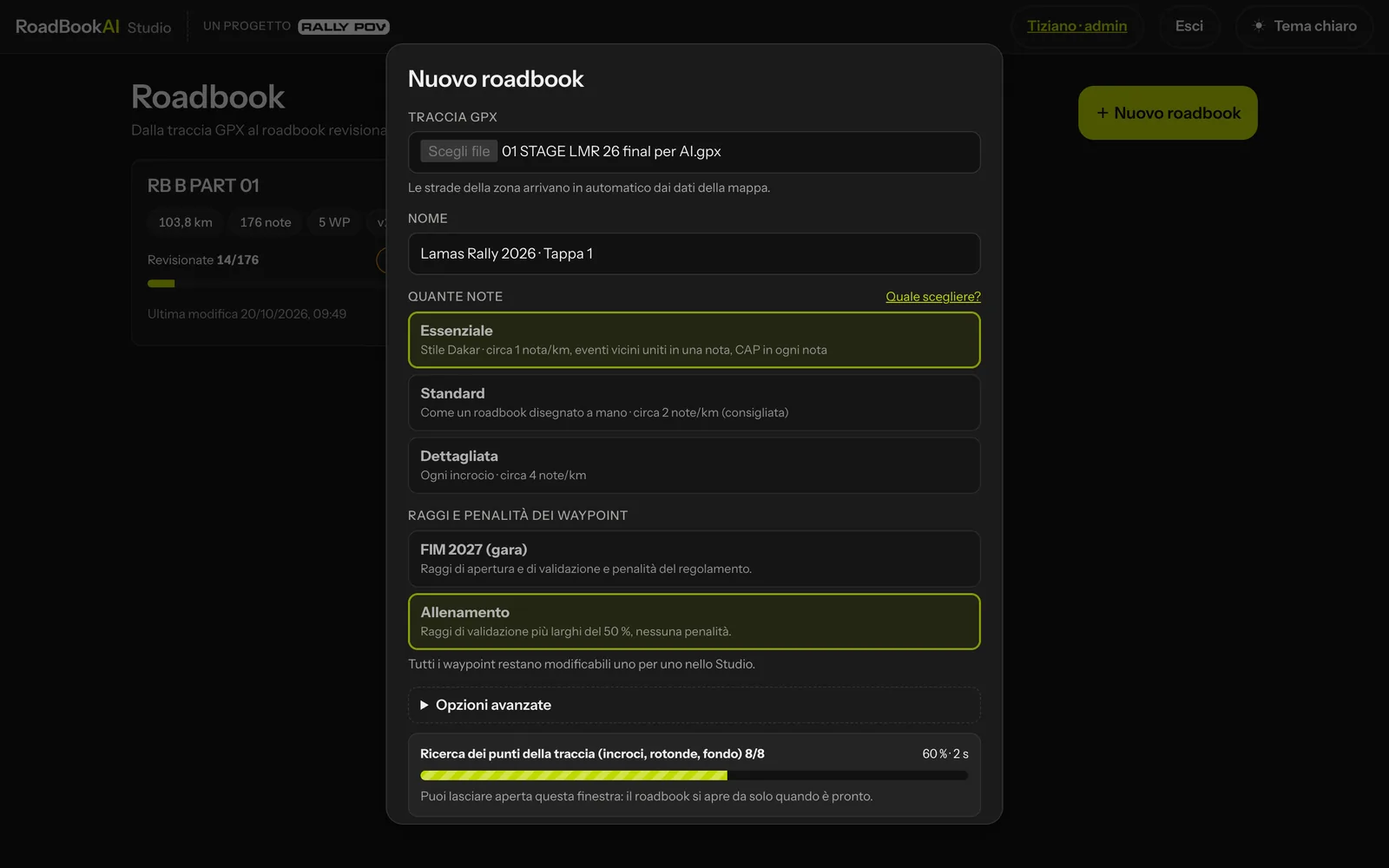 The New roadbook window.
1. GPX track
Choose the .gpx file (20 MB at most). If the file is not a readable GPX or contains no points, the Studio tells you straight away and nothing starts.
The track is the foundation of the roadbook: it is never moved, redrawn or snapped to the roads. The km of each note is measured on the track exactly as it is.
2. Name
It is filled in automatically with the file name; you can change it (for example "Lamas Rally SS1"). It is the name you see in the library and the one that ends up in the exported files.
3. How many notes
This sets how many notes the engine proposes. You can always add or reject notes later, in the Studio.
| Choice | Notes | What it is like |
|---|---|---|
| Essential | about 1 per km | Dakar style: nearby events are merged into the same note ("ET à X m") and every note has a CAP. |
| Standard (recommended) | about 2 per km | like a hand-drawn roadbook: a note when the rider might hesitate, when the road really changes or when an action is needed. On long straights FRO (road) or FPP (track), with "/N km" if the section is long; no note for straight-on junctions with only minor branches. CAP only where it's needed. |
| Detailed | about 4 per km | every junction, CAP on every turn. |
Which one to choose
- Standard works almost every time: it is the one we use for races and training.
- Essential for fast, long stages, in the desert or on open tracks, when the rider wants few notes with a CAP.
- Detailed for sections of dense navigation (villages, networks of tracks) or to see everything the engine has found, before thinning it out.
Where the CAP appears (Standard)
The CAP is written where it really helps: at the start of an off-track section, at the exit onto a faint track, at forks between tracks with at least three options. Never on asphalt or in a village.
4. Waypoint radii and penalties
| Choice | For what |
|---|---|
| FIM W2RC 2027 (race) | opening and validation radii and penalties from the regulations (waypoint table of the W2RC regulations). |
| Training | the same types, with validation radii 50 % wider and no penalties. |
| One of your profiles | the radii you have saved under a name, for example those of your own race (see Organiser profiles). |
This choice sets the values proposed when you add a waypoint. Before generating you can see the profile's table and, with Edit before generating, change a few values for this time only or save them as a new profile. Every waypoint can still be edited individually in the Studio, and on a roadbook already generated you can apply a radius profile to all waypoints or to one type only. The values are in FIM rules in brief.
The roads of the area
The engine reads the roads, tracks, buildings and signs from the map. Each note shows what the map knows, without inventing anything: whatever is missing you can add in a moment with the drawing editor.
The system decides where to get them from:
- if the server already holds the map of the region and it covers the whole track, it uses that (the fastest route, even for long stages or stages spanning several regions);
- otherwise it downloads the roads along the track online, tile by tile; areas already downloaded for another roadbook are reused from the server's memory.
Administrators will find in Advanced options the option to upload their own map file: it is usually not needed.
During generation
The job joins the server's queue, in the right lane: generations that use the regional map already on the server never wait for those downloading roads online. If there are other jobs ahead, the window says how many (running and waiting) and the estimated wait; Cancel the job stops the generation and frees its place. Then a bar shows the percentage, the current phase in plain words and the elapsed time:
| Phase | What you see |
|---|---|
| Reading the track | the start, a few moments |
| Roads of the area | the tiles downloaded (for example 12/40); while waiting for a response from the map server, the message says so (waiting for the map server). If the regional map is being read, an animated bar with the count of elements read |
| Finding points on the track | junctions, roundabouts, bends, surface, in eight steps |
| Choosing the notes | which points become notes, at the chosen density |
| Note drawings | one drawing per note, with the count (35/120) |
| Saving | version 1 of the roadbook |
The percentage never goes backwards and the bar keeps moving even when a step takes a long time: the work is progressing. The longest phases are usually downloading the roads of an area never seen before and the drawings. You can leave the window open: at the end the editor opens on the new roadbook, at the first note to review.
What the engine finds
- junctions and forks, even offset ones, roundabouts with the right exit, significant bends;
- changes of surface (asphalt, track, small track, faint track, off-track HP);
- bridges, fords, railways, woods, start and end of off-track sections;
- landmarks such as buildings, STOP and give way signs, traffic lights and cobbles (with icon and length), when the map shows them.
Every note keeps its source, confidence and reason: you can read them in the inspector, in the Where it comes from section.
The note drawing
For each note the engine cuts out about 200 × 155 m of terrain around the point, rotated so that the direction of arrival points upwards, and draws to scale:
- the true shape of the GPX track (the blue line, with its bends);
- the roads and tracks from the map that fall inside the frame: asphalt as a double line, tracks as a single line, starting exactly from the blue line;
- buildings as floor plans and nearby roundabouts.
The road the rider is travelling on is not redrawn: the blue line represents it.